
Platform foundation
Catalogues, Portals and Libraries
The product library, catalogues, standards and portals that every downstream module draws from — more than 4,800 items, 6,700 components and 3,300 manufacturers, in a database dedicated to each client.
Product Library
- A library built to support every phase of the project.
- Greater security, privacy, and speed — each client has an independent database.
- Rich database including items, manufacturers, AutoCAD blocks/REVIT models, electromechanical requirements, generic specifications, IT requirements, and many other attributes, widely used in healthcare facilities.
- More than 4,800 items, 6,700 components, 3,300 manufacturers worldwide, 5,400+ product catalogues, and 65 medical and non-medical categories.
- Flexible product categorization means PEquip can be used in any industry — ideal for all types of furniture, fixtures, equipment, building construction materials, and more.
Quantification of Services
- Electromechanical, IT, and audiovisual requirements are quantified per component, giving architects and engineers precise requirements by space, department, floor, and project.
- Power consumption can be calculated directly in the program rather than from design drawings or manual calculations.
- Civil, structural, and weight requirements are documented as specific design instructions in the database and on the drawings.
Metric and Imperial Values
- Supports consultants who base their designs on both metric and imperial values, with built-in conversion tables for dimensions and weight.
- Unique descriptions can differentiate products between HTM and other standards.
- Quantities can be assigned to medical gases per component.
Unique Identifier Numbers by Technology Level
- Item numbers are automatically generated to identify low, medium, and high technology levels.
- Enables different budgets and unique attributes — including manufacturer datasheets — for each level per product.
- Clients can use their own item numbers alongside PEquip's automatically generated unique numbers.
- Each item includes both a generic and a detailed description tied to a unique item and component number.
IT Integration Requirements
- Captures all IT and audiovisual integration and connectivity requirements for each component, as more medical equipment relies on IT solutions and applications.
- Supports not just reporting, but also the specifications exported to design drawings.
Data Standardization and Import
- Standardizes data across manufacturers, suppliers, products, components, tenders, and units of measure.
- Imports data to streamline the use of post-design modules.
- Some clients choose to use only select modules — such as Project Management, Specifications, e-Tendering, Tender Evaluation, e-Procurement, Execution, and Asset Management — while keeping their original, independent AutoCAD or REVIT design in a third-party system.
- PEquip's Admin Module includes a table that cross-references the original consultant's item numbers with PEquip's database item numbers.
- An Excel-based import template lets you bring all departments and rooms into the PEquip project database once a new project has been set up in the Project Management Module.
- A second Excel template allows you to import new assemblies and components, along with their attributes, directly into the Products Management Module.
- Once these templates are complete, users can attach the original room equipment list — using the original item numbers — through a table in the Admin Module.
Generic Specifications
- Easily populate online specifications with scores and weights.
- Give customers the ability to review and comment on generated specifications.
- Can be used to solicit technical and financial offers from suppliers through the Electronic Bidding Module.
- Specifications can be written generically to apply across multiple manufacturers, or based on specific, preselected manufacturers to accommodate international practices.
- Generate a complete specification document in a single click, pulling data from multiple sections — including electromechanical requirements, IT integration, warranties, manufacturers, options and accessories, and physical characteristics.
- Specifications can be customized per project and published in formats such as CSI.
Products Catalogue
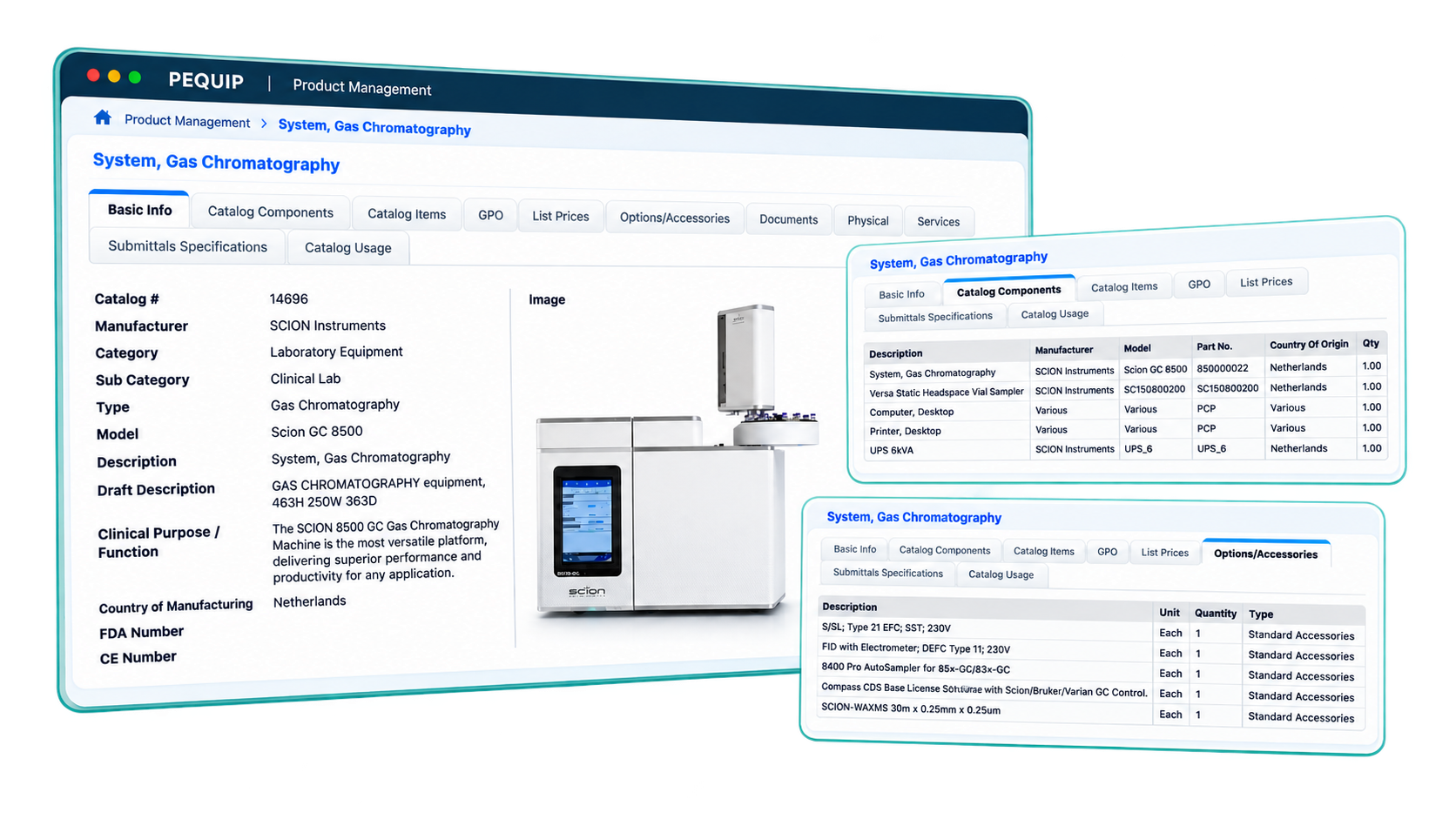
- Stores manufacturer data linked to one or more items.
- Accessible from multiple locations to help develop generic specifications or select a “Basis of Design” during planning.
- Each catalogue entry can include multiple components to assemble entire systems in one place.
- Every component includes electromechanical attributes and services in both metric and imperial values, across multiple electrical voltages.
- Accessories and consumables can be added as standard or optional.
- Documents such as catalogues, cut sheets, CAD and REVIT files, and manuals are all accessible from the Documents tab.
- List prices can be added by country and currency, as well as GPO contract prices.
- Lets users compare similar products side by side to select the best option.
Manufacturers Management
- Distinguishes between product manufacturers and suppliers, since suppliers are typically tied to specific countries and regions.
- Links each product and manufacturer to the suppliers who actually sell it in a given territory.
- Manufacturers can upload their product information through a secure portal, helping providers evaluate different technologies on the market.
- Users can also populate and update the Products Catalogue as they estimate, plan, and execute projects online.
- Each product is assigned to specific categories, subcategories, and types, and can be linked to unique components and items in the database.
- Manufacturer-neutral, so product data isn't restricted to any one source — users can view and compare products from multiple manufacturers to identify the best fit for their project.
- Provides normalized product information and descriptions for consistent naming.
- Manufacturers must register as users to grant clients permission to include their product data in the manufacturers' database.
Vendor Management and Portal
- Vendors can efficiently and accurately complete and submit technical and financial offers, along with company profiles, through the dedicated Vendor Portal.
- Rather than attaching offers, bidders complete compliance statements line by line online, which speeds up evaluation and improves accuracy.
- The same portal supports submission of material approvals, shop drawings, purchase order acceptance, and other functions.
- Vendors can use their private portal to submit bids and other documents, and track the outcome of their submissions.
- Vendors can also arrange deliveries and prepare packing lists and QR codes ahead of shipping.
- Each vendor user receives a unique username and password per project to maintain confidentiality, along with email notifications for any required actions.
- Vendors can also submit handover data — including PPM and calibration schedules — for incorporation into asset management.